
Match night · 4K streaming
Best Broadband for Streaming UK
A Tuesday Netflix episode can hide a slow cabinet. A 4K football stream cannot. Count the screens, check the official app speeds, then compare the written estimate for your address. The sports login is a different bill.
The quick answer
A busy UK household watching live sport should compare the advertised average speed, the personalised minimum guarantee, and whether several 4K streams share the line at kick-off. Netflix recommends 15 Mbps per 4K stream, Disney+ 25 Mbps for 4K UHD, YouTube 20 Mbps, and Sky Stream 25 Mbps, or 30 Mbps for UHD. TV rights and app logins are separate from the broadband contract.
Key takeaways
- App minimums are per stream: Netflix 15 Mbps for 4K, Disney+ 25 Mbps for 4K UHD, YouTube 20 Mbps, Sky Stream 25 Mbps or 30 Mbps for UHD, BBC iPlayer up to 5 Mbps HD and 24 Mbit/s for full Ultra HD.
- Count simultaneous 4K televisions at kick-off. One 4K stream can sit on 50 to 100 Mbps; several streams plus evening congestion is a 100 to 300 Mbps full-fibre job, not automatically gigabit.
- FTTC and many cable connections share a cabinet or node, so Saturday 3pm and 7pm to 10pm can stall even when the advertised average looks fine. Full fibre is far less affected.
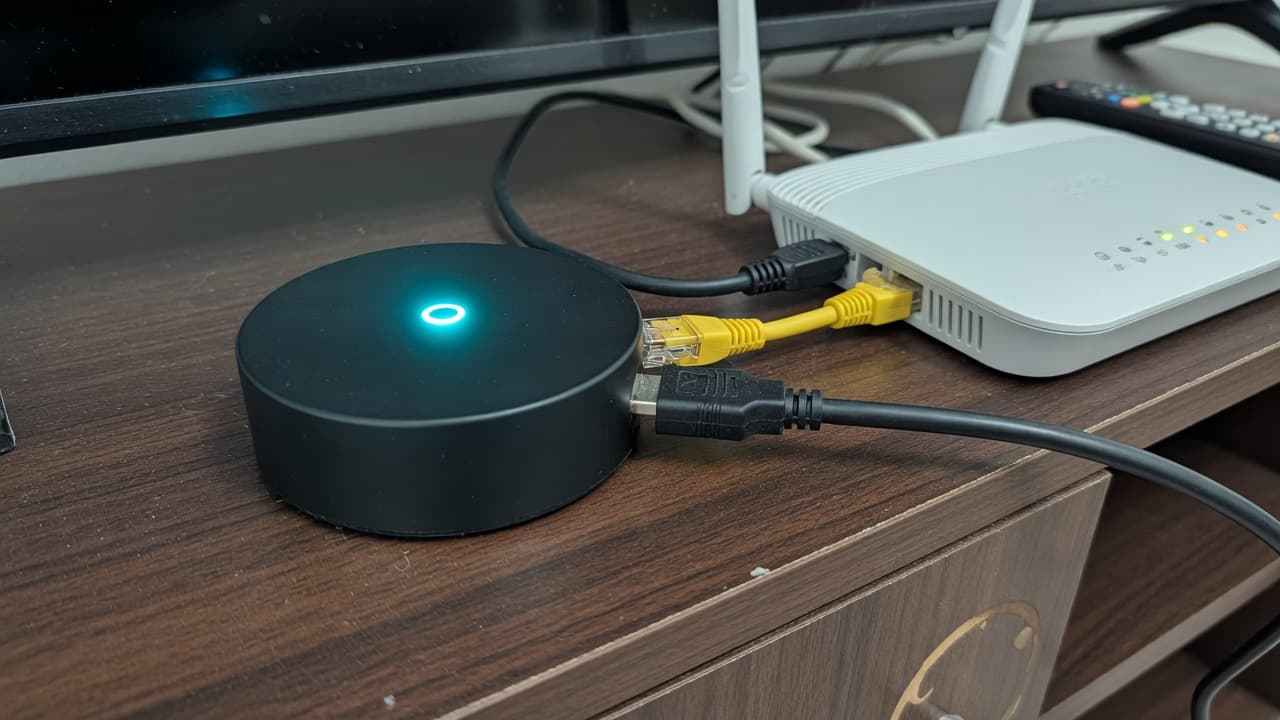
- A weak Wi-Fi signal in the TV room mimics a slow package. Ethernet to the puck or console is the first fix.
- Sky Sports, TNT Sports, Netflix and Disney+ are licences. They are not a broadband upgrade. Compare the line, then the channels.
Match night is not a Tuesday film
On-demand video can buffer a few seconds ahead. Live sport cannot. When a Premier League kick-off or an F1 lights-out starts, the stream has to keep arriving. The same thing happens in a house where two 4K televisions, a tablet and a laptop all start together. The useful number is not the fastest advertised average in Britain. It is whether the line still holds those streams at 3pm on a Saturday, and again between 7pm and 10pm.
FIFA World Cup 2026 already ran from June. The broadband lesson did not leave with the trophy. BBC iPlayer still publishes Ultra HD figures for live events, and the Saturday 3pm pile-up on a shared cabinet is the same physics. Treat this page as a live-sport and multi-room streaming guide, not a countdown to a tournament that has finished.
Official speeds, not forum guesses
Streaming apps publish their own recommended speeds. They are per stream, on a stable connection, and they assume the television can actually use that quality. They are not a household package size.
| Service | HD / Full HD | 4K / UHD or live | Source |
|---|---|---|---|
| Netflix | 3 Mbps (720p), 5 Mbps (1080p) | 15 Mbps for UHD / 4K | help.netflix.com/node/306 |
| Disney+ | 5 Mbps for HD | 8 Mbps live, 25 Mbps 4K UHD | Disney+ Help, recommended speeds |
| YouTube | 2.5 Mbps (720p), 5 Mbps (1080p) | 20 Mbps for 4K UHD | Google Support answer 78358 |
| Sky Stream / Glass | 25 Mbps recommended minimum | 30 Mbps for UHD or an extra puck | Sky Glass FAQs |
| BBC iPlayer | Up to 5 Mbps HD, 1.5 Mbps SD | 24 Mbit/s full 3840-pixel UHD | BBC iPlayer Help |
Netflix also says High data usage for Ultra HD can reach 7 GB per hour per device. Disney+ Help lists about 7.7 GB per hour on a TV set to Automatic 4K UHD. Those are data-use figures, not extra megabits you must buy. Unlimited home broadband still has to deliver the bits in real time. We have not invented NOW or Amazon Prime Video megabit figures here. For Sky Sports picture add-ons, use our Sky Sports and TNT Sports cost guide.

How many 4K streams share the line?
Add the publisher figures, then leave headroom. Two Disney+ 4K streams are already 50 Mbps of recommendation before anyone opens YouTube on a phone. A Sky Stream puck wants 25 Mbps on its own, or 30 Mbps if you add UHD or a second puck. Wi-Fi, video calls and cloud backups sit on top. That is why a 50 Mbps copper line that looks fine for one Netflix evening can collapse when the household watches two matches.
| Household pattern | Starting speed to compare | Watch for |
|---|---|---|
| One HD television, light phone use | 30 to 50 Mbps | iPlayer HD is only about 5 Mbps; Wi-Fi still matters |
| One 4K television | 50 to 100 Mbps | Netflix 15 Mbps, Disney+ 25 Mbps, Sky UHD 30 Mbps |
| Two 4K screens, or 4K plus home working | 100 to 300 Mbps | Simultaneous streams at kick-off |
| Several 4K TVs, gaming and uploads | 300 Mbps or full fibre gigabit | Evening congestion and upload, not the sticker |
For a wider household calculator, see what broadband speed you need and broadband speeds explained. The streaming job is narrower: keep the pictures up when everyone watches at once.
Evening buffering, cabinets and cable nodes
Buffering is often blamed on “slow broadband” when the contract is fine at lunchtime. FTTC fibre-to-the-cabinet and many cable connections share capacity with other properties on the same street cabinet or node. When the street streams at once, your speed can fall. Full fibre to the premises is far less affected because each home has its own fibre rather than a shared last stretch. That is the same distinction we make in the full-fibre explainer.
Ofcom still tells people to check the personalised speed estimate and the minimum guaranteed speed, not a national average. Its choosing-broadband advice is the right order: address first, then the contract. If the measured evening speed at the router is already below the app’s 4K figure, buying a new streaming stick will not help.
The television is often a Wi-Fi problem
A fast result beside the router and a stuttering 4K picture on the far wall is not a reason to buy gigabit. It is a coverage problem. Plug the streaming puck, games console or smart TV into Ethernet if you can. If the set has to sit on Wi-Fi, test in that room and read how to fix Wi-Fi dead spots. A new iPhone with Wi-Fi 7 does not raise the speed coming into the house. That is the point of our Wi-Fi 7 guide.
Replacing an aerial with apps does not remove the need for a usable signal in every watching room. Our Freely TV guide covers that swap, including the service minimum and why room-level Wi-Fi still matters.
4K football, F1 and other live streams
Live 4K football is the stress test. The picture is large, the audience is simultaneous, and you notice every stall. Disney+ puts live content at 8 Mbps, above its HD film figure, because a live encode cannot quietly catch up. Sky’s own consumer pages still separate HD streaming from 4K or Ultra HD and tell busy homes they need more than one device’s minimum. Sky’s streaming-speed note is useful even if you are not a Sky broadband customer.
BBC iPlayer remains the public-service check. High-quality programmes stream at up to 5 Mbps, standard quality at 1.5 Mbps. Ultra HD on a connected TV wants 24 Mbit/s for the full 3840-pixel experience, or 12 Mbit/s for 2560-pixel Ultra HD. Those UHD events include live sport when the BBC offers it. They are not a reason to buy a gigabit package on their own.
If the house also downloads large games, the streaming line still has to survive the evening. Our GTA 6 broadband guide is about a wired console download in November, not 4K football. Do not mix the two jobs into one panic upgrade.
TV rights are not the broadband contract
Sky Sports, TNT Sports, Netflix and Disney+ are licences. The Openreach or altnet line is a separate product. You can watch NOW Sports without Sky broadband. You can take a cheap full-fibre altnet and keep the apps. You can also buy a Sky or Virgin bundle and still buffer if the Wi-Fi in the lounge is weak. Compare the line first, then the channels.
For the bill that actually carries the matches, use the cheapest way to watch Sky Sports and TNT Sports and the broadband and TV deals comparison. We may earn a commission if you take a broadband deal through Get Deal. We do not currently earn a commission on NOW, Netflix, Disney+ or HBO Max.
Full-fibre deals to compare, not a streaming special
These are ordinary broadband packages at the time of writing. None of them is a Netflix or Sky Sports subscription. We may earn a commission if you sign up through Get Deal.
We may earn a commission when you click a “Get Deal” button. This does not affect our editorial independence.
- Best Value

- Speed
- 150 Mbps
- Monthly price
- £12.50/mo
- Contract
- 12 months
- Setup
- Free

- Speed
- 35 Mbps
- Monthly price
- £18.50/mo
- Contract
- 12 months
- Setup
- £4.95
- Fastest

- Speed
- 300 Mbps
- Monthly price
- £19.00/mo
- Contract
- 18 months
- Setup
- Free
- Speed
- 150 Mbps
- Monthly price
- £19.50/mo
- Contract
- 18 months
- Setup
- Free
| Provider | Speed | Monthly price | Contract | Setup | Affiliate link |
|---|---|---|---|---|---|
| 150 Mbps Superfast | £12.50/mo | 12 months | Free | |
| 35 Mbps Superfast | £18.50/mo | 12 months | £4.95 | |
| 300 Mbps Ultrafast | £19.00/mo | 18 months | Free | |
| 150 Mbps Superfast | £19.50/mo | 18 months | Free |
Is 100 Mbps enough? Is 300 Mbps enough?
100 Mbps is enough for one 4K stream and ordinary extra use if the measured speed stays near that figure. It is the wrong answer if two 4K TVs start at kick-off on a line that already drops in the evening.
300 Mbps is the comfortable family size for several 4K streams, phones and a console. It is not magic. On shared FTTC or cable it can still sag. On full fibre it is usually more than streaming needs.
Gigabit is for homes that already know they move large files, game online, work from home and run many 4K screens. It is a poor cure for a dead spot behind the sofa. Check current deals and an address-specific comparison rather than a national “best for streaming” league table. If you would rather answer a few questions than read speed tables, use Broadband Match.
A simple order of operations
- Count how many 4K streams will run at the same time.
- Test beside the router, then at the television, ideally over Ethernet.
- If Ethernet is slow in the evening, compare full fibre at the address.
- If Ethernet is fine, fix Wi-Fi in the TV room before buying a faster tier.
- Buy the sports or film apps only after the line can hold them.
Streaming broadband FAQs
Sources
- Netflix: recommended internet speeds, 720p 3 Mbps, 1080p 5 Mbps, 4K 15 Mbps
- Netflix: High quality 4K data use up to 7 GB per hour
- Disney+: 5 Mbps HD, 8 Mbps live, 25 Mbps 4K UHD
- YouTube: 4K UHD 20 Mbps, 1080p 5 Mbps, 720p 2.5 Mbps
- Sky Glass FAQs: 25 Mbps recommended, 30 Mbps for UHD or an extra Stream puck
- Sky: good internet speed for streaming, HD and 4K ranges
- BBC iPlayer: HD up to 5 Mbps, SD 1.5 Mbps
- BBC iPlayer: UHD 24 Mbit/s for 3840-pixel, 12 Mbit/s for 2560-pixel
- Ofcom: choosing broadband, personalised estimates and minimum speeds
- Ofcom: Connected Nations coverage and speeds
- BroadbandPicker review methodology